
Choosing a Student Information System usually starts with a feature list.
Grades. Attendance. Payments. Reporting. Student portal. Documents.
Most established SIS platforms can check many of those boxes.
The harder question is what daily work actually feels like once the system is running.
For career and postsecondary schools, that means looking beyond whether a module exists and asking how information moves between departments, how reporting works, what students can do on their own, and what support the school receives after implementation.
CampusLogin’s Student SIS was built around that operating reality.
What does CampusLogin’s Student SIS cover?
CampusLogin tracks student information throughout the lifecycle, including grades, attendance, student progress, finances, payments, transcripts, communications, and career services. Schools can also give students and faculty self-service access through dedicated portals. (Great Exposure Inc.)
The platform is role-based, so admissions, registrar, finance, student services, instructors, and career services can work from the same underlying data while using views relevant to their responsibilities. (Great Exposure Inc.)
That matters because many SIS problems are not caused by missing data.
They come from data being stored in different places.
Student management is more than storing records
CampusLogin’s Student Management tools are designed to make current student status visible.
Schools can track academic progress, identify no-shows and dropouts, monitor outstanding payments, and use departmental dashboards to spot bottlenecks or trends. (Great Exposure Inc.)
Grades, attendance, finances, and communications stay connected to the same student record.
That gives staff context when something changes.
A registrar looking at attendance, a finance team reviewing an outstanding balance, and student services checking progress are not rebuilding the student story from separate spreadsheets.
What does reporting look like?
Reporting is one of the places SIS platforms differ most in practice.
CampusLogin includes automated reporting, data views by recruiter, program, and source, and year-over-year comparisons. Reports can be customized and delivered automatically rather than rebuilt manually each time. (Great Exposure Inc.)
The platform also includes departmental dashboards, which gives teams a faster way to see operational issues without waiting for a monthly report.
For schools using both CampusLogin CRM and SIS, reporting can extend further back into the recruitment process. Great Exposure says most CampusLogin clients combine the two products, allowing data to flow from lead management through the student lifecycle. (Great Exposure Inc.)
How does student self-service fit in?
Students can use the CampusLogin portal to access documents, view financial information, and interact with other parts of their student record. The platform also supports attendance options such as barcode, fingerprint, and geo-tracked login methods. (Great Exposure Inc.)
For administrators, that removes some routine back-and-forth.
For students, it means fewer basic questions require a call or email.
That is a small operational detail that can make a noticeable difference once enrollment grows.
What support comes with CampusLogin?
Implementation is not treated as a software handoff.
Great Exposure states that each school receives a dedicated account manager, a welcome call to understand existing business practices, a customized setup checklist by department, and training for stakeholders and users. (Great Exposure Inc.)
For smaller career colleges, that can matter as much as the feature set.
A flexible system only helps if staff know how to configure and use it around the way the school actually operates.
How does CampusLogin compare with other career-school SIS platforms?
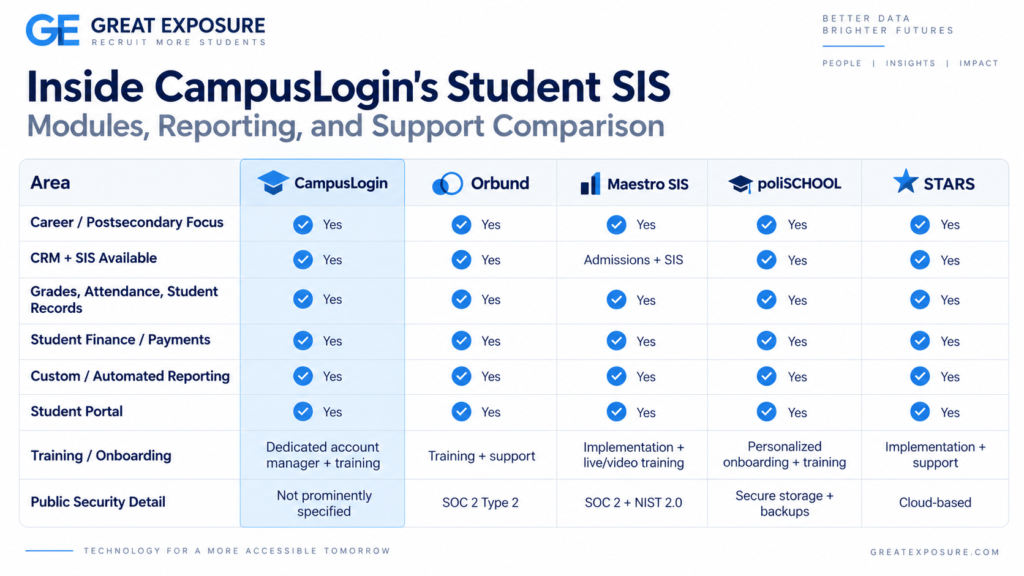
There is no single “best” SIS for every school. Each vendor has a different mix of strengths.
Competitors are strong here. Orbund publishes extensive reporting, automation, financial tools, and SOC 2 Type 2 security. Maestro emphasizes configuration, implementation support, compliance, and security. poliSCHOOL positions heavily around career-school specialization, flat pricing, training, and customization. STARS also covers the student lifecycle from lead through placement. (Orbund)
CampusLogin’s distinction is less about having one feature nobody else offers.
It is the combination of postsecondary-specific SIS operations, CRM connectivity, communications, reporting, and hands-on account support inside the same environment.
What should a school evaluate before choosing an SIS?
A demo should go beyond “Does it have attendance?” or “Can it produce transcripts?”
Ask to see how a student record moves between departments.
Ask how reports are created.
Ask what staff see when a student is behind academically or financially.
Ask how students access information themselves.
And ask what implementation looks like after the contract is signed.
Those answers usually tell you more than the length of the feature list.
CampusLogin is built specifically for postsecondary institutions and can be deployed as a Student SIS or combined with its Leads CRM for a connected view from recruitment through enrollment and student operations. (Great Exposure Inc.)
For schools comparing SIS platforms, the real test is not how many modules are listed. It is how easily those modules help the school run as one system.